How shipping refunds affect Shopify profit

Refunding a customer's shipping charge gives money back without bringing a product back. That distinction matters when you review how Shopify refunds and shipping affect profit. A refund total alone cannot tell you how much product cost you recovered.
By the Numbers now shows estimated refunded shipping separately in Refund Profit Impact. Kept Gross Profit and the P&L's Refund Impact no longer count that shipping amount as cost you got back. You can review the shipping portion before deciding what your refunds mean for profit.
Separate shipping refunds from returned goods
A shipping refund and a product return answer different questions. The first tells you what money went back to the customer. The second tells you whether goods came back to your store.
Imagine you give a customer their delivery charge back after a late arrival. They keep the order, so that refund brings no goods back onto your shelves. Treating it like recovered product cost would make the refund look less costly than it was.
Now imagine a customer returns an item and you refund both the item and its shipping charge. The goods may be available to sell again, but the shipping charge is still money given back. Keep those parts separate when deciding how much value the return restored.
Also separate the customer's shipping charge from your carrier bill. Giving the charge back to the customer does not mean the carrier returned your delivery cost. A return label is another expense to check when you pay for the journey back.
A partial refund can also leave the goods with the customer, as with a goodwill payment for a defect. Check whether merchandise returned before treating the refund as evidence of recovered stock.
The condition of the goods matters, too. An unopened item ready for resale is different from one you must discard or mark down. Inspect the return before assuming that getting the item back restored its value.
Read Shipping Refunded beside the profit impact
Start with Shipping Refunded beside COGS Recovered and Net Profit Impact. The report tracks what refunds cost after recovered product cost, with refunded shipping shown on its own. Shipping Refunded is an estimate, so use it as a guide when reviewing the period.
Open Reports and look under Profitability for Refund Profit Impact. Choose the period you want to review, then find Shipping Refunded in the table. The Refund Profit Impact help article explains the report and its controls.
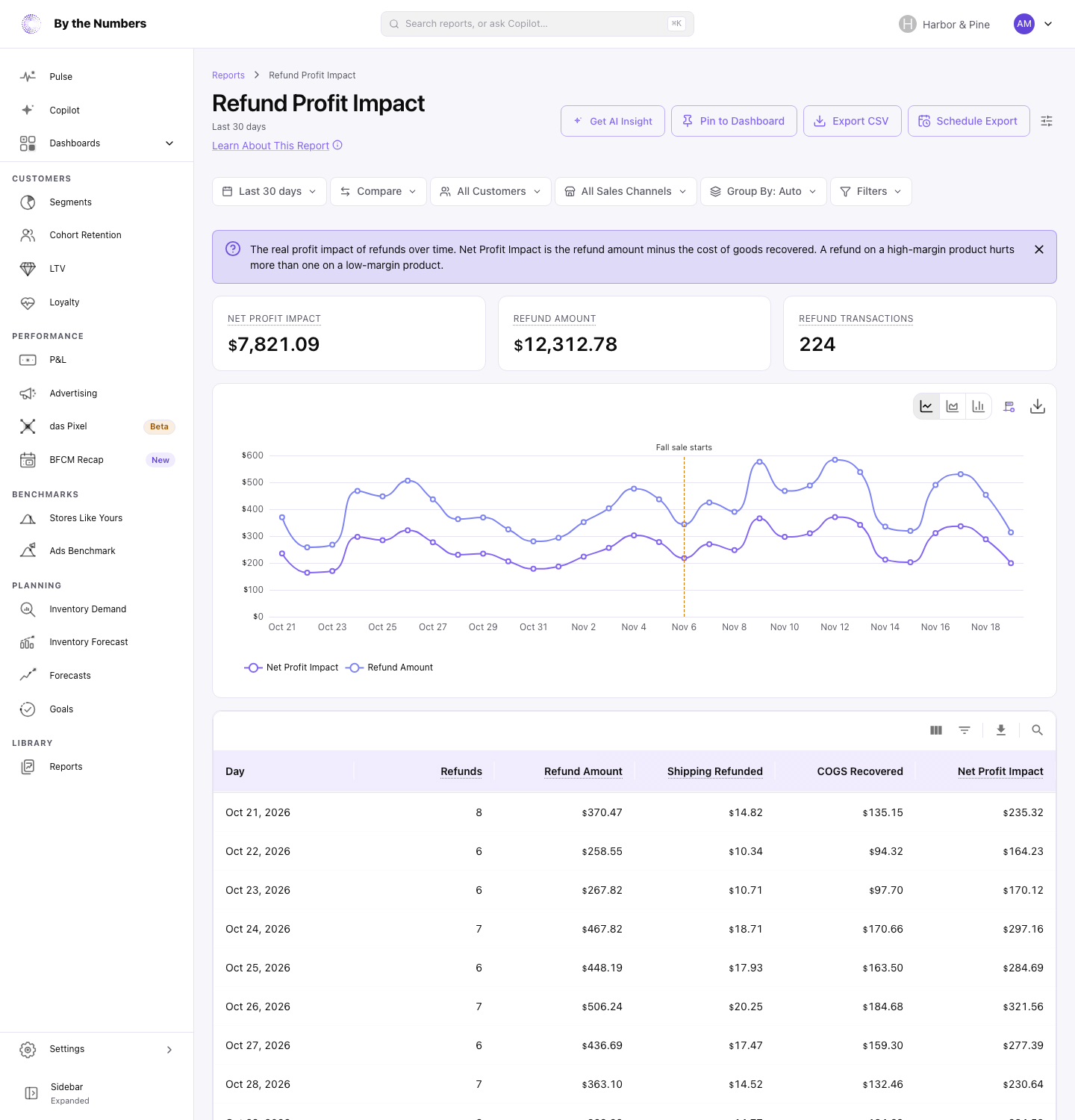
Read the refund amount first to understand the money given back. Then look at the shipping portion before interpreting the profit impact. This keeps a delivery charge refund from looking like goods whose cost you recovered.
The change also matters when you move to the broader profit view. Kept Gross Profit and the P&L's Refund Impact now leave refunded shipping out of recovered cost. Use that distinction when reviewing refunds alongside the rest of your Shopify profit and P&L reporting.
If you need to issue a shipping refund, follow Shopify's shipping refund instructions. That is a separate task from reviewing its effect on profit afterward.
Check the costs behind your next decision
Use the report to decide what needs a closer look before changing your policy. A shipping refund following late delivery calls for a different response from a damaged product return. Review customer messages and the goods themselves to understand the reason.
For the next refund review, check these questions:
- Did the customer receive a shipping charge refund, an item refund, or both?
- Did goods come back, and can you sell them in their current condition?
- What outbound freight, return freight, packaging, or handling costs remain paid?
- Does your payment provider return the original processing fee? Check the payout record rather than assume.
A profit review needs that wider context. The shipping refund amount does not replace your carrier invoices or the inspection of a returned item. Keep your ecommerce KPI dashboard focused on the measures that support the decision you are making.
If delivery complaints repeat, check the delivery promise and carrier service before tightening the returns policy. If fit complaints repeat, review sizing information and product photos. Choose a change that addresses the reason customers asked for money back.
A generous policy can reassure buyers, but its costs still need room in your margin. Avoid changing it solely because one period looks expensive. Review the pattern alongside your broader ecommerce KPIs, and remember why surface metrics can hide store problems.
Keep reading
If you want the full picture on ecommerce metrics and KPIs, start with the KPIs that actually move Shopify revenue.
Related reading: Are your Shopify discounts too deep?, Average Order Value by Industry and Ecommerce Benchmarks: Data From Shopify Stores.
By the Numbers builds this into the dashboard. See Shopify ecommerce reporting.
See what is working in your Shopify store
By the Numbers turns your store data into reports, segments, and forecasts.
- AI-powered analytics
- Customer segmentation
- Predictive forecasting
- One-click Shopify install