Are your paid visits earning enough?

More paid visits are useful when the revenue they bring justifies what you spend to attract them. Paid traffic ROAS helps you judge that return, but it needs the cost and revenue figures beside it.
GA4 CPC Sessions in By the Numbers now shows paid visits alongside ad cost, ad revenue, and ROAS. Its By Campaign tab lets you compare campaigns before deciding where to investigate. Start with the campaign that raises a question about your spending, then check what could explain its return.
Read revenue beside the cost of visits
ROAS tells you how much advertising revenue you receive for each dollar spent on ads. Read it as a measure of revenue return, then check whether your margins make that return worthwhile.
A campaign can bring in more revenue than its ads cost and still leave too little to cover other expenses. Products, shipping, payment fees, and discounts affect what remains from a sale. A store with thin margins needs more revenue from the same advertising dollar than a store with generous margins.
That is why a rising visit count cannot settle the budget question. You need to know whether those visits became revenue and how much you paid for them. Even a rising ROAS deserves a second look if the campaign now sells products with lower margins.
Start with the paid visits report
Open Reports, look under Marketing, and choose GA4 CPC Sessions. Choose the period you want to review, such as the dates of a promotion you recently ran.
Read Ad Cost and Ad Revenue together, then look at ROAS. The report shows Google Ads cost alongside the revenue and paid visits. You can examine the figures over time or compare campaigns.
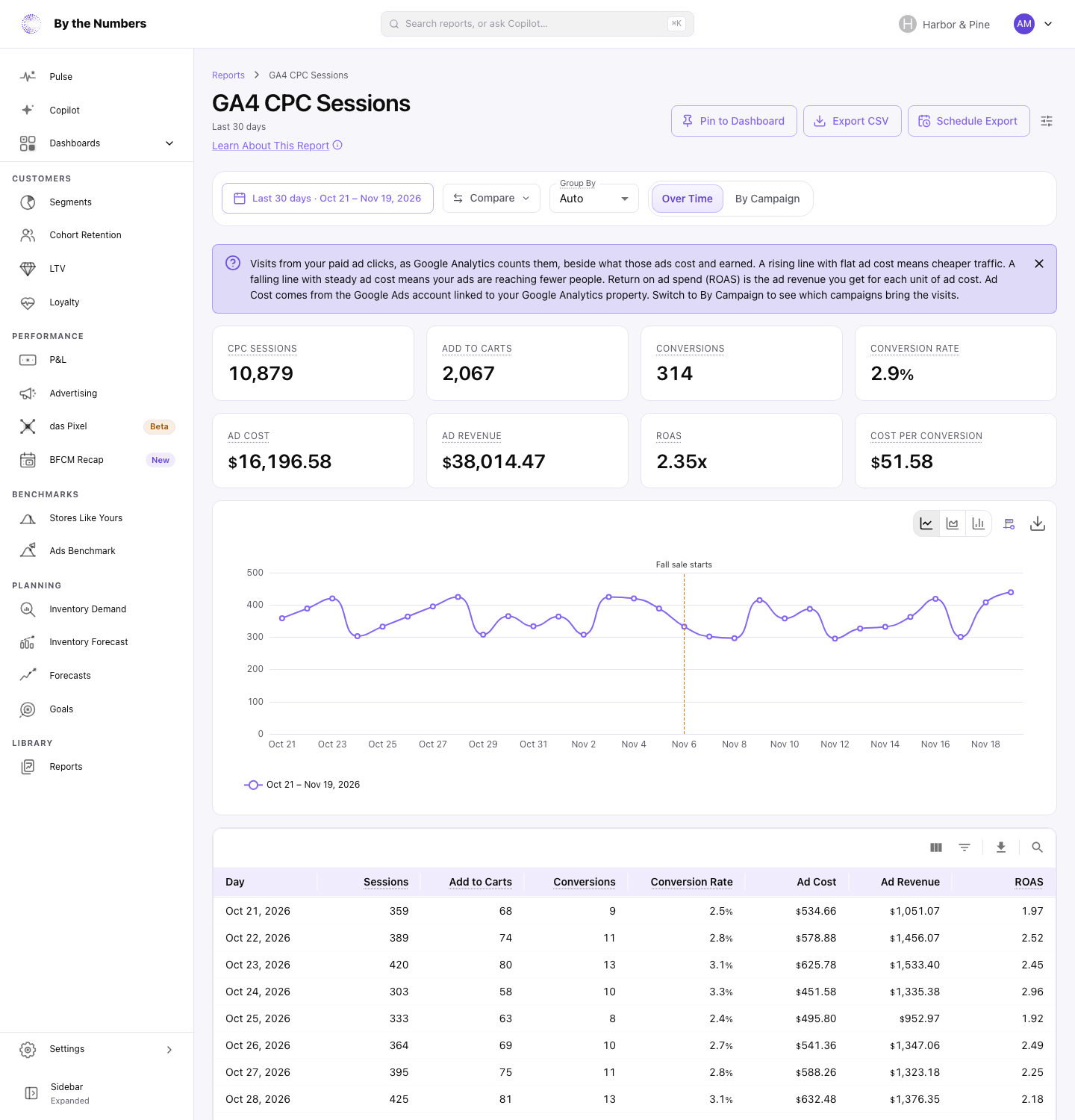
Use the GA4 CPC Sessions help guide for connection steps and checks when a figure is missing. Resolve a missing figure before treating it as evidence that a campaign performed poorly.
The screenshot shows where to start reading. Your decision should come from your own store's figures and costs, rather than the example shown here.
Compare campaigns before changing the budget
Switch to By Campaign to compare the campaigns behind the overall return. Start with a campaign whose cost looks substantial beside its revenue. A strong overall result can hide a campaign that deserves attention.
A small campaign can show a higher ROAS while bringing in less revenue than a larger campaign. Before moving money, ask whether extra spending could bring enough additional revenue to justify the cost.
Consider a product promotion that brought plenty of paid visits but little revenue. Those visits suggest the ad attracted attention; they do not establish that the offer persuaded people to buy. Review the advertised product, its availability, its price, and the page shoppers land on.
Check whether the page delivers what the ad promises. An ad promoting a particular product should make that product easy to find and evaluate. Look for confusing delivery terms, an unavailable variant, or an offer that differs between the ad and the page.
If a campaign's revenue looks healthy but its advertising cost leaves little room for your other costs, review spending. Check its budget and targeting before increasing it. Treat these checks as possible explanations, rather than conclusions the report has already proved.
Give the return some context
Compare campaigns with their purpose in mind. A campaign reaching people who already know the store answers a different question from one introducing a new product. Their immediate revenue returns may differ without telling you which deserves the next advertising dollar.
Keep the period consistent when comparing figures. A promotion, a stock shortage, or a change in the products advertised can make one period unlike another. Note those changes before attributing the difference to the ad itself.
ROAS also leaves questions about later purchases and the wider business unanswered. Revenue credited to an ad does not prove the sale happened only because of that ad. Our ROAS versus MER guide explains how campaign return differs from overall advertising efficiency.
For campaign names that are difficult to recognize, use the Shopify UTM naming guide to plan clearer names for future links.
Choose the next question to answer
Finish the review with a campaign, a concern, and a specific action. You might inspect the landing page for a campaign with visits but weak revenue. You might review spending where the revenue return leaves too little margin.
Record what you changed and what you expect to learn when you review the campaign again. This keeps a report review connected to a decision, rather than a list of figures.
Use the broader Shopify advertising budget guide when the question becomes how to divide spending across channels. For the wider product offering, see By the Numbers' advertising ROI reports.
Keep reading
If you want the full picture on ROAS and attribution, start with the ROAS and attribution guide.
Related reading: UTM naming conventions for a Shopify team, ROAS vs MER: Which Metric to Trust on Shopify and Marketing Attribution Models Explained for Shopify.
By the Numbers builds this into the dashboard. See advertising ROI.
See what is working in your Shopify store
By the Numbers turns your store data into reports, segments, and forecasts.
- AI-powered analytics
- Customer segmentation
- Predictive forecasting
- One-click Shopify install